SEO Fundamentals for Shopify Store Owners
Most Shopify merchants know SEO matters, but not how it actually works. This guide breaks down the foundations: what SEO is, what Shopify handles for you, how Google finds and ranks your store, and where to focus first.
Here's a common experience for new Shopify merchants: you spend weeks setting up your store, filling it with products, and crafting descriptions you're proud of. Then you open Google, type in the name of your most important product, and your store is nowhere to be found. Page one belongs to Amazon, large retailers, and sites you've never heard of.
It feels like SEO is some kind of black art. Complex, technical, and reserved for people who have been doing it for years. But the reason most Shopify stores don't rank isn't that SEO is impossible; it's that nobody has explained how it actually works in plain language.
This guide does exactly that. By the end, you'll understand what SEO is, why it matters for your store, what Shopify handles for you automatically (and what it doesn't), and what you should focus on first. No jargon. No filler.
What Is SEO?
Search engine optimisation (SEO) is the process of making your store easier for Google to find, understand, and show to people who are searching for what you sell.
That's it. You're not tricking an algorithm. You're not gaming a system. You're communicating clearly: to Google, and through Google, to the right customers. When you write an accurate product title, add descriptive alt text to your images, and build pages that genuinely answer what searchers are looking for, you're doing SEO.
One thing worth understanding early: paid search (Google Ads) puts you at the top of results while your budget runs. The moment you stop paying, the traffic stops. Organic search is the opposite: a product page or blog post that earns a ranking keeps delivering traffic for months or years, without ongoing spend. SEO is slower to build, but the returns compound over time.
Why SEO Matters for Your Shopify Store
The most obvious reason: people who find you through a Google search are already looking to buy. They've typed in a specific query ("organic cotton tote bags uk" or "bamboo toothbrush subscription") and they're actively seeking a solution. That's a very different mindset from someone scrolling through an Instagram ad who didn't ask to see your product.
Organic traffic is also fundamentally different in how it compounds. A blog post you write today that ranks for a useful keyword will still be sending traffic to your store two years from now. A paid ad stops the moment you pause the campaign. Over time, a store that invests in SEO builds an asset. A store that relies entirely on paid acquisition rents its traffic, and the rent keeps going up.
The third factor is independence. Shopify stores that rely heavily on paid social or marketplace channels are vulnerable to algorithm changes, rising CPMs, and platform policy updates. A strong organic presence gives you a channel you control: one that can't be taken away by a platform decision overnight.
The scale of the opportunity is significant: according to BrightEdge research, organic search drives over 53% of all website traffic, making it the single largest acquisition channel across the web, outpacing paid search, social, and direct combined.
What Shopify Handles (and What You Still Need to Do)
One of the most useful things to understand as a Shopify merchant is exactly what the platform does for your SEO, and where your responsibility begins. Most guides skip this entirely, leaving merchants either over-confident ("Shopify handles SEO for me") or overwhelmed ("I have to do everything").
The reality is somewhere in the middle:
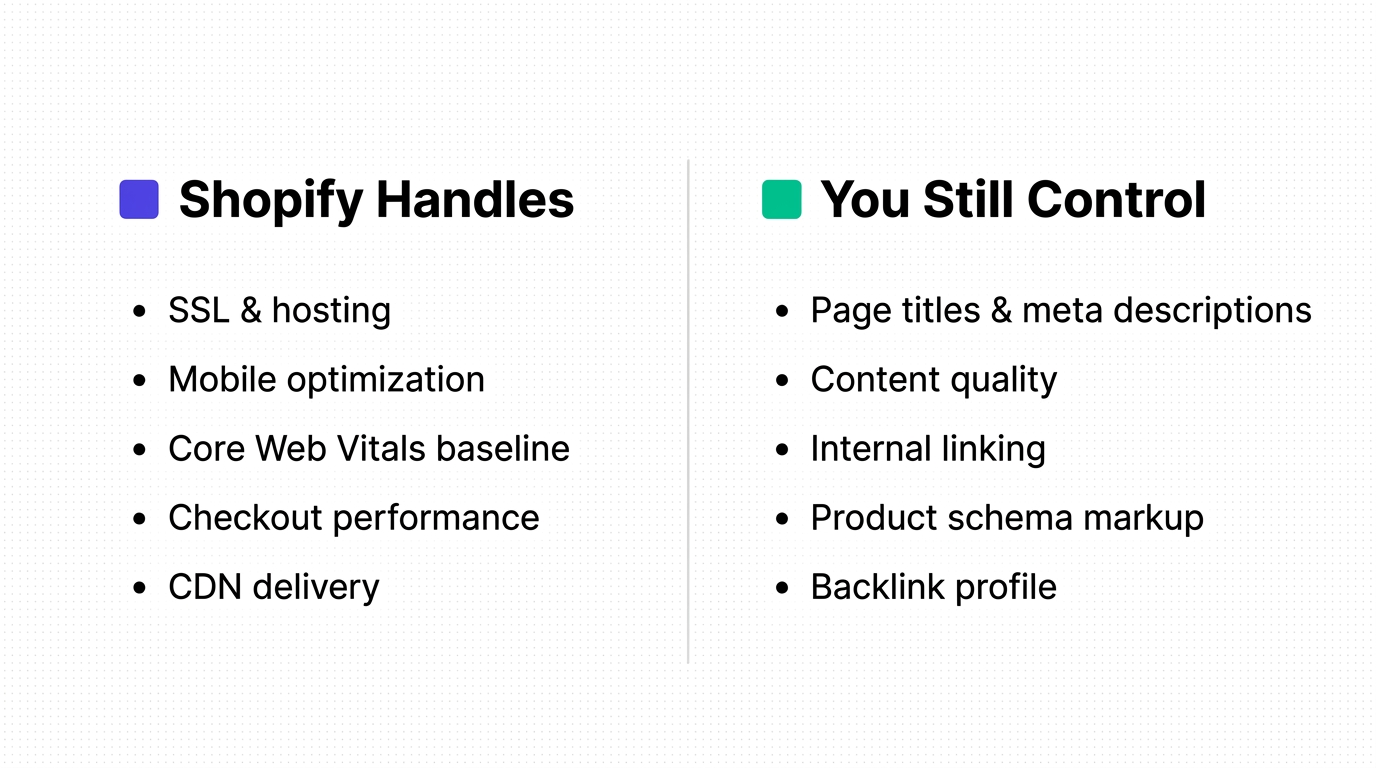
Shopify's built-in SEO features cover the technical foundations that would otherwise require developer work. But the gap between "technically crawlable" and "actually ranking" is wide, and it's filled by everything in the right-hand column above.
Tools like Smart SEO are built specifically to bridge this gap: automating meta tag generation, image alt text, and structured data so merchants can focus on strategy and content rather than repetitive optimisation tasks.
How Google Actually Finds and Ranks Your Store
Most merchants think of SEO as a single thing: ranking on Google. In reality, there are four separate steps between "your store exists" and "your store appears in search results." Understanding the distinction helps you diagnose why a page might not be ranking.
Step 1: Discover
Google learns your store exists through two main routes: your XML sitemap (which Shopify submits automatically) and links from other websites. A brand new store with no inbound links may take weeks to be discovered.
Step 2: Crawl
Googlebot (Google's automated spider) visits your pages and reads the content. If your pages are blocked by your robots.txt, load too slowly, or are hidden behind login walls, crawling fails. This is also the stage where mobile-first indexing matters (more on this below).
Step 3: Index
After crawling, Google decides whether your page is worth including in its index. Thin content (a product page with a one-sentence description), duplicate content, or pages marked "noindex" will be excluded. A page can be live on your store while being completely invisible in search because it was crawled but not indexed.
Step 4: Rank
For indexed pages, Google determines where to show them in response to a particular search query. This ranking decision is based on hundreds of signals: keyword relevance, content quality, page speed, backlinks, E-E-A-T signals, and more. Ranking is the output of everything else done right.
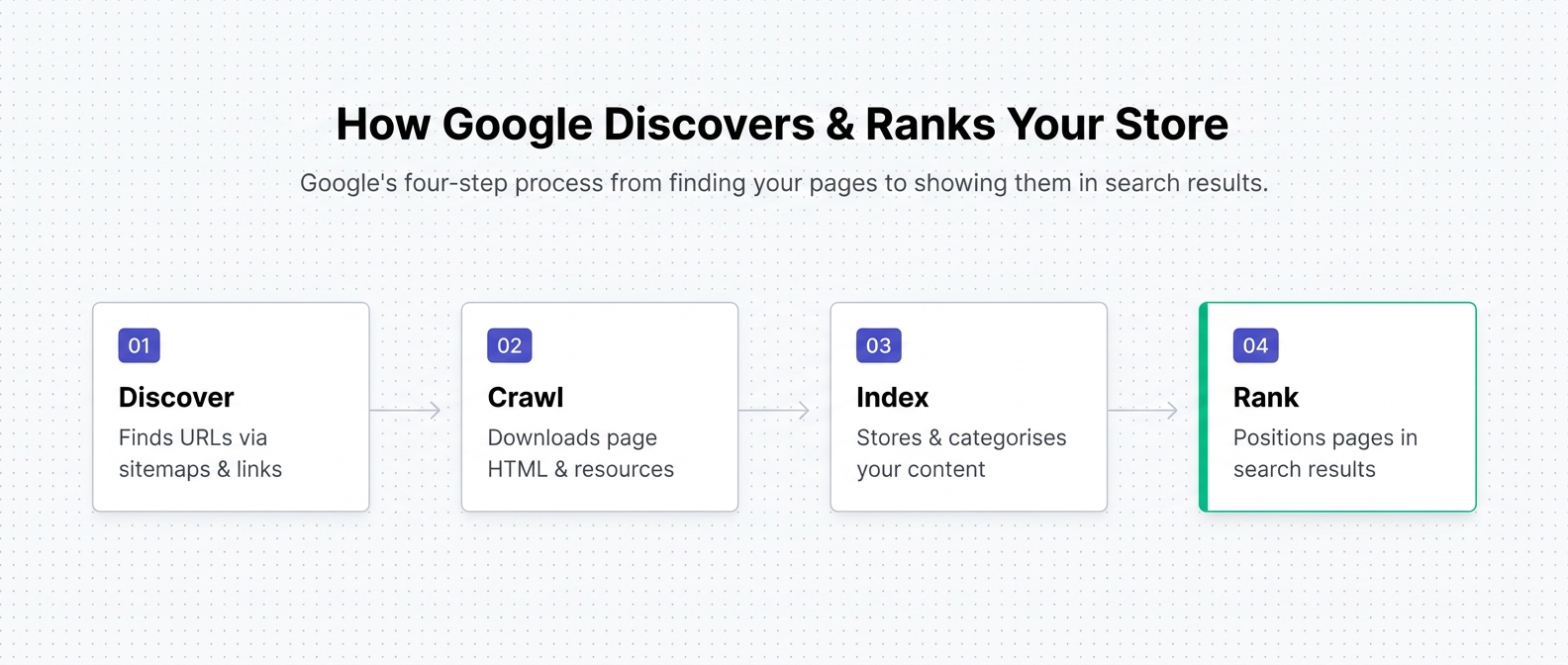
The practical takeaway: if a product page isn't showing up in Google, the problem isn't necessarily ranking; it might be indexing, crawling, or discovery. This is why setting up Google Search Console (covered below) is the first priority for any Shopify store.
The Five Core Areas of Shopify SEO
SEO is often taught as a single topic. In practice, it breaks into five distinct areas, each with its own role. You don't need to master all of them at once, but understanding what each area does helps you prioritise where to start.
1. Keywords: the language your customers use
Keywords are the words and phrases your potential customers type into Google. Keyword research is the process of finding out what those are and understanding the intent behind them.
Intent matters more than volume. There are two types of searches you care about as a merchant:
- Informational ("best moisturiser for dry skin"): searchers are researching, not yet buying. Serve these with blog content and guides.
- Transactional ("buy organic moisturiser UK"): searchers are ready to purchase. Serve these with well-optimised product and collection pages.
Matching your content to the right intent is more valuable than stuffing keywords into a page. Google has gotten very good at understanding what searchers actually want. A product page crammed with keywords but lacking genuinely useful information will rank below a clear, informative page targeting the same terms.
Long-tail keywords (more specific phrases) are disproportionately valuable for smaller stores. "Running shoes" is dominated by giants. "Zero-drop trail running shoes wide feet UK" is yours to own. More on this in the content section below.
If you encounter unfamiliar terms throughout this guide (canonical URLs, structured data, crawl budget), the Shopify SEO Vocabulary explains all of them in plain language.
2. On-page SEO: what's on each page
Every page in your Shopify store is its own opportunity to rank for something. On-page SEO is about making each page as clear and relevant as possible to both Google and to human visitors.
The core on-page elements are:
- Meta title: the title Google displays as the clickable link in search results. One of the highest-impact on-page factors.
- Meta description: the snippet of text below the link. Doesn't directly affect rankings but heavily affects click-through rate.
- H1 heading: the main heading on the page. Every page should have exactly one, and it should include your primary keyword naturally.
- Body content: product descriptions, collection introductions, and blog copy.
- Image alt text: text descriptions of images that Google reads in place of visual content.
One important Shopify-specific detail: the product title does three jobs at once. In Shopify, your product title is simultaneously the H1 heading shown on the page, the default meta title used in search results, and the default title used when the page is shared on social media. A poorly named product ("Blue Widget Model 3XL") damages your SEO, your click-through rate, and your social sharing: three ways at once. Write product titles the way your customers search for them.
One more common mistake worth calling out: Shopify's default meta title format is "Product Name: Store Name". Many merchants leave this entirely unchanged. For high-traffic pages especially, a manually written meta title that leads with the target keyword and includes a compelling reason to click will consistently outperform the default.
3. Technical SEO: removing blockers
Technical SEO doesn't require developer skills for a Shopify merchant. What it does require is an understanding of the things that can silently block your pages from being crawled, indexed, or ranked well.
The key technical areas are:
- Page speed: slow-loading pages rank lower and lose visitors before they see your product
- Mobile friendliness: Shopify themes are responsive by default, but app bloat can break this
- Indexation: are your pages actually appearing in Google's index?
- Redirects: deleted or moved products need proper redirects to avoid losing ranking credit
- Structured data: machine-readable markup that helps Google display richer results (star ratings, prices, availability)
One critical point about mobile-first indexing: Google indexes and ranks your store based on its mobile version, not desktop. Most merchants optimise while looking at their desktop layout; they may never check what their store looks like to Google's mobile crawler. Key risk: some Shopify themes collapse product descriptions into an accordion or "Read more" section on mobile to save screen space. Google can index content hidden in JavaScript-triggered elements, but content immediately visible on load is treated as more prominent. If your key product description is fully expanded on desktop but collapsed behind a tap on mobile, that content may carry less weight in Google's index. Audit your product pages on mobile, not just desktop.
4. Content: supporting traffic beyond product pages
Product and collection pages rank for transactional searches: people who are ready to buy. Blog posts, guides, and long-form content rank for informational searches and capture potential customers at an earlier stage of their journey.
A merchant who only optimises product pages is leaving half the SEO opportunity untouched.
The small store long-tail advantage: A Shopify store cannot outrank Amazon or large retailers for "running shoes." But it absolutely can rank for "zero-drop trail running shoes for wide feet UK." Long-tail keywords are more specific, lower in competition, and higher in purchase intent, because someone who searches for exactly what you sell is much closer to buying than someone typing a broad category term. SEO is not a race against giants. It's about owning the specific searches your ideal customers make. Small stores win through specificity.
Well-crafted blog content also earns backlinks naturally. Useful, original guides attract links from other websites, which is one of the strongest ranking signals Google uses. Every piece of content you publish is a potential link magnet.
5. Backlinks: external trust signals
A backlink is a link from another website to yours. Google treats backlinks as votes of confidence: if a respected website in your niche links to your product page or blog post, that's a signal your content is trustworthy and relevant.
One quality backlink from a respected publication, industry blog, or relevant website is worth more than a hundred links from low-quality directories. The goal is relevance and authority, not volume.
What not to do: buy links. Google's spam policies are explicit and the enforcement is real. Paid link schemes can result in manual penalties that take months to recover from. Build links through content that earns them, digital PR, and genuine relationships in your niche.
E-E-A-T: Why Google Needs to Trust Your Store
E-E-A-T stands for Experience, Expertise, Authoritativeness, and Trustworthiness. It's Google's framework for evaluating the quality and credibility of content, and it applies with particular force to ecommerce stores.
Why? Because Shopify stores are asking people to spend money. Google classifies transactional pages as "Your Money or Your Life" (YMYL) content: the kind where a wrong or untrustworthy result causes real harm to the user. Google holds YMYL pages to a higher standard. A store that appears unreliable, thin, or generic will lose ranking ground to one that demonstrates genuine credibility.
Here's how E-E-A-T applies concretely to your store:
Experience: show real-world product knowledge. Google wants to see content created by someone who has actually used or encountered the products. This means:
- Detailed descriptions that go beyond generic spec sheets: describe how the product feels, how it's used, who it's for
- Photos and videos showing products in genuine use contexts, not just white-background studio shots
- User-generated content, especially customer reviews
Key insight: Customer reviews do three things for your SEO simultaneously: they add fresh content to your pages, introduce natural long-tail language that mirrors how real customers search, and provide visible E-E-A-T trust signals. Actively encourage customers to leave reviews. It's passive SEO that compounds without any writing effort from you.
Expertise: demonstrate you know your niche. A credible About page that tells your brand story, blog content that genuinely helps your target audience, and product copy that reflects deep knowledge of your category all signal expertise to Google. Generic descriptions that could apply to any store signal the opposite.
Authoritativeness: build your reputation off-site. Mentions and coverage from industry publications, relevant bloggers, and media outlets signal that your brand has standing in your market. This is closely related to link building; a backlink from a respected source is one of the clearest authoritativeness signals available. Third-party review platforms (Google Reviews, Trustpilot) also contribute: they provide independent validation of your store's reputation that Google can read and weigh.
Trustworthiness: remove the reasons not to buy. This includes:
- HTTPS (Shopify handles this automatically; the padlock is a basic trust signal)
- Clear, visible return and shipping policies
- Accessible contact information
- Genuine customer reviews displayed on product pages
- Trust badges where appropriate
Google doesn't publish an E-E-A-T score anywhere. It's a framework that describes the signals Google reads across your entire site to assess whether your content can be trusted. Strong E-E-A-T means Google is more confident surfacing your pages to searchers, especially on high-intent, high-value queries.
To see how these trust signals show up as concrete issues in your store (thin descriptions, missing schema, unverified business information), the Shopify SEO Audit guide walks through every page type and what to look for.
What Makes Shopify SEO Unique
Shopify introduces some SEO considerations that don't apply on other platforms, or apply differently. Understanding these means you're not caught off guard by platform-specific challenges that quietly undermine your rankings.
The duplicate URL issue. In Shopify, a product can be accessible at two different URLs: the direct URL (/products/product-name) and a collection-path URL (/collections/collection-name/products/product-name). Without the right handling, this creates duplicate content that splits ranking signals between two identical pages. Shopify adds canonical tags automatically to point Google to the correct URL, but merchants should always link to the /products/ URL in their internal links and navigation, not the collection-path version.
Collections are your highest-value SEO pages. Most Shopify merchants treat collection pages as navigation: a way to organise products into categories. In reality, collection pages are often your most commercially important SEO pages. They rank for category-level keywords ("men's leather wallets," "organic skincare UK"): broad, high-volume transactional searches that no single product page can target alone. A well-optimised collection page with a unique introduction, good internal structure, and links from elsewhere in the site can drive more traffic than your top 20 product pages combined. Most merchants leave collection pages almost entirely unoptimised.
The thin content trap. Shopify makes it very easy to import hundreds of products quickly. Many stores do exactly this, with copied manufacturer descriptions, no collection-page copy, and product titles optimised for nothing. One store with 20 well-written, original product pages will outrank a store with 500 thin ones. Quantity without quality is an SEO liability, not an asset. Google's algorithms have become highly effective at identifying and deprioritising low-effort, duplicated content.
App bloat. Every app installed on your Shopify store can add scripts and code to your pages. A store with 15–20 apps may have significant page speed degradation that directly hurts rankings. Core Web Vitals (Google's page experience signals) are affected by load time, interactivity, and layout stability. Audit your installed apps periodically and remove anything that isn't earning its place in your stack.
Limited server access. Standard Shopify plans don't allow customisation of robots.txt. Shopify Plus does. This is only relevant for advanced SEO use cases, but it's worth knowing if you run into a situation where you need granular crawling control.
Where to Start With Shopify SEO
The most common mistake Shopify merchants make with SEO is trying to do everything at once, and doing nothing properly as a result. Start with one thing, do it properly, then move to the next.
Most Shopify stores have never set up Google Search Console. This is a free tool from Google that shows you exactly which pages are indexed, what search queries your pages appear for, whether Google has encountered any errors on your site, and how your pages are performing in search results. Without it, you're flying blind. You don't know if Google has indexed your products. You don't know if there are errors silently blocking pages from appearing. You don't know what your store is already ranking for. Step one, always, is Search Console.
After that, work through this priority order:
- Set up Google Search Console and verify your store
- Check the Coverage report: make sure your products and collections are being indexed
- Write original meta titles and descriptions for your most important products and collections
- Add alt text to all product images
- Write original product descriptions (don't copy manufacturer copy)
- Add introductory copy to your top collection pages
- Build your first blog content to support your key collections
Not sure what's actually broken on your store before working through this list? Run the Shopify SEO Audit first. It tells you exactly which of these steps need attention on your specific store.
This gives you a solid foundation before moving into more advanced work like structured data, link building, or content clusters. Doing the fundamentals properly matters more than doing everything at once. Once the basics are in place, the Shopify SEO Roadmap & Checklist shows you what to prioritise next and how to keep it healthy.
How to Track Your SEO Progress
SEO moves slowly, and most changes you make will take three to six months to show visible results. This means your tracking system needs to be reliable, not anxiety-inducing.
Google Search Console (free) is your primary tool. Track impressions (how often your pages appear in search results), clicks, average position, and any coverage or crawl errors. Check it monthly, not weekly. Weekly checks create noise without signal; organic search moves too slowly for weekly conclusions to be meaningful.
Google Analytics adds the commercial layer: how much of your traffic comes from organic search, which pages are driving it, and whether that traffic converts into sales.
For a store-specific health check, Smart SEO's AI SEO Audit gives you a structured assessment of what's working, what's blocking performance, and what to prioritise, translating raw technical signals into clear, actionable recommendations without requiring you to interpret data manually.
Set a monthly review date, track the right metrics, and resist making reactive changes based on short-term fluctuations. SEO rewards consistency and patience more than any other marketing channel.
Frequently Asked Questions
Does Shopify have built-in SEO?
Yes, but only the basics. Shopify automatically generates your XML sitemap, adds canonical URL tags to prevent duplicate content, handles HTTPS, and provides mobile-responsive themes. These cover the technical foundations. What they don't cover: keyword strategy, meta titles and descriptions, original product content, structured data, image alt text, backlinks, and ongoing optimisation. Those are your responsibility, and they're where the difference between a store that ranks and one that doesn't is made.
How long does Shopify SEO take to show results?
Expect three to six months for early signs of traction: higher impressions in Search Console, some movement in rankings for targeted keywords. Consistent, meaningful organic traffic typically takes six to twelve months of sustained effort. Stores starting from scratch (new domain, no links, no established content) should plan on the longer end. Stores migrating from an established domain with existing authority will see results faster. The work you do in month one shows up in month four.
Do I need an SEO app for Shopify?
Not strictly required, but highly practical. An SEO app accelerates the repetitive tasks: generating meta titles and descriptions at scale, applying alt text across a large product catalogue, implementing structured data, and auditing for technical issues. For a store with fewer than 20 products, doing it manually is manageable. For anything larger, an app makes the difference between SEO being done consistently and SEO being done sporadically or not at all.
What's the most important SEO thing to do for a new Shopify store?
Set up Google Search Console and verify your store. Then check that your core product and collection pages are actually indexed. Many new stores are missing from Google's index entirely, not because of any technical error, but simply because they haven't been discovered yet or have content that isn't indexable. Fix visibility first. You can't optimise what Google can't see.
What is E-E-A-T and does it affect my Shopify store?
E-E-A-T (Experience, Expertise, Authoritativeness, Trustworthiness) is Google's framework for evaluating the credibility of content and its creators. It applies directly to ecommerce because merchants are asking people to trust them with their money. Google holds transactional pages (product pages, checkout flows) to a higher standard than informational content. Concrete steps to improve your store's E-E-A-T: write detailed, original product descriptions; show products in real-use contexts; collect and display customer reviews; maintain clear policies and contact information; and build genuine backlinks from relevant sources in your niche.
What's Next?
This guide gives you the foundation. The natural next step is putting it into practice with a structured action plan: knowing not just what to do, but in what order, and how to diagnose what's holding your specific store back.
The natural next step is the Shopify SEO: Complete Guide, which maps out the full five-layer SEO system, what Shopify handles and what you must do yourself, and where to focus based on where your store is right now. Or explore what Smart SEO automates for you: meta tags, structured data, broken links, and AI citation tracking.
Related Articles
Shopify SEO Vocabulary: Key Terms Store Owners Need to Know
Crawling, canonical URLs, structured data, meta titles, backlinks: thirteen Shopify SEO terms explained in plain language, in the order that makes them make sense.
How Search Works in 2026 (And What It Means for Your Shopify Store)
A plain-English guide to how Google and AI search actually work in 2026: AI Overviews, zero-click results, answer engines, and why solid SEO still decides whether your Shopify store gets found.
Shopify SEO Roadmap & Checklist: What to Do First and How to Keep It Healthy
Diagnose, then prioritize, execute, and maintain. Situation-based roadmaps, a 30/60/90-day plan, page-by-page checklists, and a weekly/monthly/quarterly routine to keep your Shopify SEO healthy.